Mega Truck Simulator Games 3D
- 4.6
- Rating
- 50.00M
- Installs
- Free
- Price
 Analysis by App-foxy
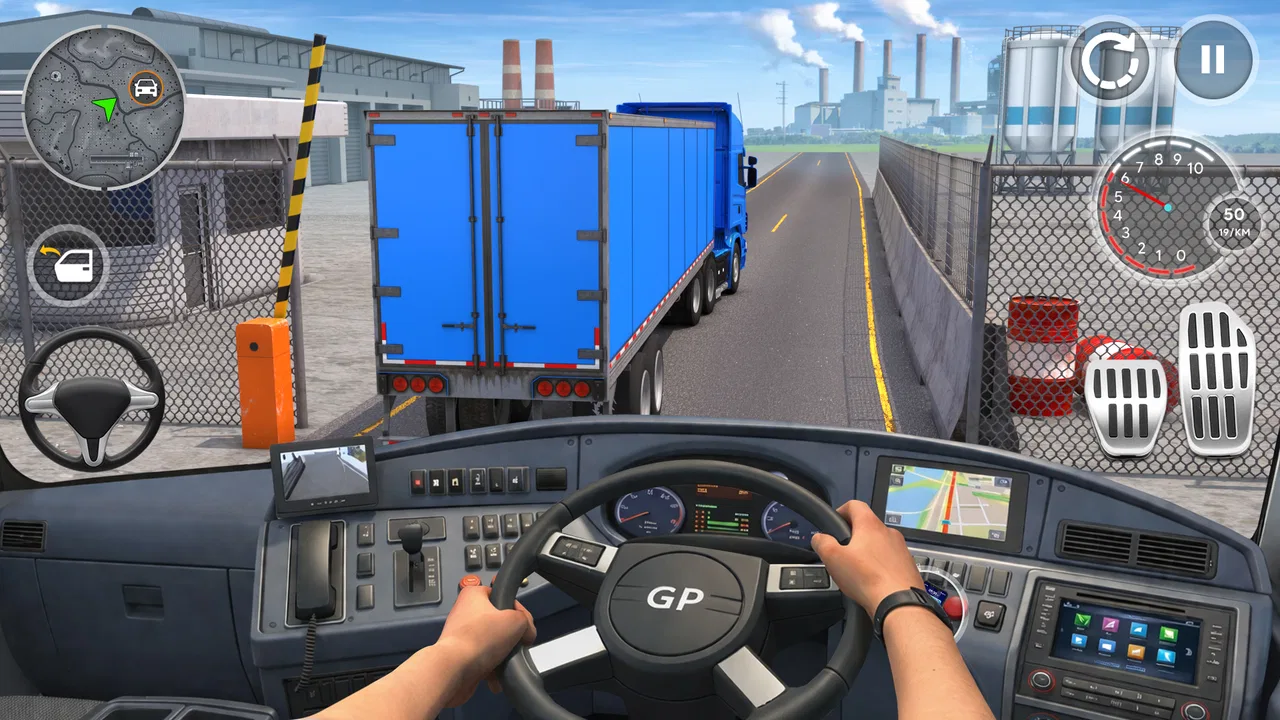
I tested Mega Truck Simulator Games 3D as the kind of driving game that can easily become a shared-device favorite. Its appeal is straightforward: it puts several vehicle styles into one simulation-focused experience, so one person can enjoy slow, careful driving while another looks for a more demanding truck run. I found it most interesting in short household sessions, where the phone or tablet moves between players and each person chooses a different way to play.
That flexibility is also the main reason to look beyond the short store description. This is not simply a game for someone who wants a quick arcade race. The pace is more suitable for players who enjoy handling a larger vehicle, judging turns, and repeating a route until the controls feel natural. It is free to start, developed by GamePark, and its Teen content rating makes it a better fit for older children and adults than for very young players.
How it fits a shared household device
In my experience, the best shared-device use is informal rather than competitive. One player can take a turn with a preferred vehicle, then pass the device to someone else without needing the whole household to commit to a long session. That makes it useful during a quiet evening, a trip, or a break when several people want to try the same game but do not want a complicated multiplayer setup.
You May Also Like

 Blood Strike: 2.5 Anniversary
Blood Strike’s Loadouts Turn Every Drop Into a Tactical Gamble
A close look at Blood Strike’s custom loadouts: how fast access to signature weapons reshapes its battle royale rhythm, rewards preparation, and narrows the gap between fights.

 Pandora - Music & Podcasts
Pandora’s Music Is Easy to Start, but Harder to Recover
Pandora’s strength is its low-effort path from a seed to a station. Its weak spot is how much confidence it asks you to place in connection, setup, and quiet recovery.

 8 Ball Pool
 Is Built on Rivalries, Rematches, and Routine
A close look at the rivalries, rematches, shared routines, and unanswered safety questions that turn a quick pool match into a persistent mobile community.

 Samsung Music
’s Quiet Strength Is Playing What You Already Own
Its reach comes less from spectacle than from dependable access to a personal library. That simplicity is both the app’s strongest retention engine and its ceiling.

 AccuWeather: Weather Radar
AccuWeather Review: A Quick, Clear Forecast for Everyday Decisions
For everyday plans, the best forecast is the one you can understand quickly. AccuWeather makes rain timing, radar, and local conditions easy to act on, with a few trade-offs.

 Hill Climb Racing
Why Hill Climb Racing Still Turns Crashes Into One More Run
A tiny car, a bumpy hill and one more upgrade: Hill Climb Racing keeps resurfacing because its simple chaos makes every near-miss feel personal.
More From Our News Desk



A realistic example is a family tablet on a kitchen table. One person may use it for a careful delivery-style drive, while another prefers experimenting with a different vehicle. The game works well in that situation because the attraction is not only winning. Learning how each vehicle behaves can be enough of a goal, especially for players who like simulation games more than fast racing.
There is an important trade-off, though. A shared device means that progress, preferences, and any purchases need to be treated as belonging to the device or the active game environment unless the household has agreed on its own boundaries. I would not hand it over casually and assume that every player has a separate, protected space. Before passing the phone around, I would check whose turn it is, whether the current session is finished, and whether another player is about to change settings or spend money.
This is one of those games where coordination matters more than people expect. If one player is still learning the steering or trying to complete a difficult drive, interrupting the session can be frustrating. A simple turn-taking rule helps: finish the current run, return the device to a neutral screen, and let the next person choose what to do. That small routine makes the experience feel much fairer on a family device.
What the driving style feels like
The simulation angle changes how I approach it. I do not play it like a conventional racing game where the quickest route and aggressive movement are always the answer. With a large vehicle, I pay more attention to entry speed, turning space, and how early I need to prepare for a change of direction. That slower rhythm gives the game its identity, but it can also feel less exciting if I am looking for constant action.
My most useful tip is to treat the first few attempts as control practice rather than serious progress. I try a route without worrying about perfection, notice how much room the vehicle needs, and only then start aiming for a cleaner run. This approach is especially helpful when several people share the same device, because each player can learn the controls without blaming another person for a poor result.
Another practical habit is to avoid making a sharp turn at the last possible moment. Truck simulation rewards planning, and a wide approach is usually easier to recover from than a rushed correction. This is not a hidden shortcut or a guaranteed technique; it is simply the kind of driving discipline that makes the game more manageable. Players who enjoy gradual improvement will probably get more from it than players who want instant speed.
The multiple-vehicle concept also gives the game more replay value than a single-truck experience. Switching vehicles can change the way I judge space and movement, so a route that feels easy in one may require more patience in another. I would use that variety as a self-imposed challenge: complete a familiar drive with a vehicle that feels less comfortable, then compare the mistakes rather than only the final result.
Setting boundaries before anyone else plays
Because the game is free, it is easy to install it for a quick trial without making a large commitment. At the same time, the game includes in-app purchases priced from $4.99 to $9.99 per item. On a shared phone or tablet, that makes an agreement about purchases essential. I would decide in advance who is allowed to approve a transaction and keep the device owner involved whenever a purchase screen appears.
This is especially important when the game is used by children. The Teen rating should be part of the decision, not an afterthought. I would consider the age and maturity of every player, explain that free installation does not mean every item inside the game is free, and avoid leaving a younger player to interpret purchase prompts alone. The rating does not replace a parent’s judgment about whether the experience suits a particular child.
I would also separate “trying the game” from “changing the household setup.” A first session should be about controls and vehicle handling. Only after that would I decide whether it deserves a regular place on the shared device. This prevents a common problem: a game is installed because it looks interesting, then becomes a source of arguments because nobody decided how turns, purchases, or progress would be handled.
For adults sharing a device, the boundary is simpler but still useful. If one person is working through a long session, another person should not open the game and alter the current state without asking. I prefer treating the device like a shared notebook: finish what you are doing, leave it ready for the next person, and communicate if you have changed anything important.
Who will enjoy it, and who may not
I would recommend this game to players who like vehicle handling, large machines, and a measured pace. It is a good match for someone who enjoys repeating a route to improve their control, or for a household where different people want to sample several driving styles from one installation. The simulation category is meaningful here because the pleasure comes from managing the vehicle, not merely reaching the finish as quickly as possible.
I would be more cautious about recommending it to someone who wants a polished competitive racer with immediate intensity. If your ideal session involves rapid overtakes, short races, and constant visual excitement, a traditional arcade racing game may be a better choice. Likewise, a dedicated trucking simulator may suit a player who wants a deeper long-haul structure, more detailed career planning, or a stronger sense of progression. This title is more approachable as a broad vehicle sampler than as a highly specialized trucking career.
It is also not the best option for very young children simply because the controls may require patience and the Teen rating deserves respect. A child who only wants colorful, uncomplicated driving could become frustrated by the need to judge space and movement. For older players, that same learning curve can be the reason to keep returning.
One advantage over many ordinary driving games is that the vehicle itself remains the focus. I am not pushed to think only about speed or competition; I can concentrate on positioning and control. The disadvantage is that the broader scope may not satisfy someone who wants one exceptionally deep vehicle system. The choice depends on whether variety matters more to you than specialization.
Performance, access, and everyday practicality
The game was released on November 30, 2023, and the current version is 1.8.8. It supports devices running Android 7.0 or later, which gives it a reasonably broad place on older Android hardware. That does not guarantee identical performance on every phone or tablet, so I would still test it on the actual shared device before promising that it will become the household’s main game.
The install base is substantial, with over ten million installs, and the average rating is 4.5 from around thirty thousand ratings. I see those figures as a useful sign that the concept has reached a large audience, but not as a substitute for checking whether its slower simulation style matches your taste. A popular game can still be the wrong fit for a particular family or device.
For a shared tablet, I would pay attention to comfort rather than only whether the game opens. Truck-style driving benefits from a screen large enough to see the road and respond without covering important areas with your fingers. A smaller phone may be perfectly usable for a single player, but passing it among several people can make the session feel cramped. If the device is older, I would close unnecessary apps before playing and give the first session enough time to reveal whether the controls feel responsive.
Another useful workflow is to keep sessions deliberately short at first. Ten or fifteen minutes is enough to see whether the player enjoys the handling, whether the device remains comfortable, and whether the game creates arguments over turns. If everyone still wants another attempt after that, the game has probably earned a longer place in the rotation. This is a better test than judging it from the icon or the short description.
Progress, purchases, and trust between players
Shared use becomes more complicated when players care about different goals. One person may want to explore vehicles, another may want to improve driving accuracy, and a third may simply want to see what the game feels like. I recommend agreeing on a purpose before each session. That prevents a player who is experimenting from being criticized for not advancing, and it stops a progress-focused player from losing time to random changes.
Purchases deserve a separate conversation. Since individual in-app items can cost between $4.99 and $9.99, I would never treat an on-screen offer as part of normal play. The person responsible for the device should review every purchase, and children should ask first even if they have used the game many times. This is not about assuming bad intentions; it is about avoiding accidental spending when the device changes hands.
I also prefer not to promise a younger player that a purchase will make the game permanently better. The value depends on how much that person actually plays and whether they enjoy the core driving before spending anything. If the free experience does not hold attention, buying an item is unlikely to solve the underlying mismatch. For most households, the sensible order is to play first, discuss the cost, and decide later.
Account expectations should be equally clear. I would not assume that the game provides separate household profiles or that each person’s progress can be isolated. Instead, I would treat the active installation as a shared space and avoid making important changes without telling the next player. That approach is less convenient than true individual accounts, but it is safer than inventing a separation the game may not provide.
Age, trust, and the right kind of supervision
The Teen rating changes how I would introduce the game at home. I would let an older child try it with an adult nearby at first, not because every moment requires supervision, but because the first session is a good opportunity to explain the purchase boundaries and the shared-device rules. Once the child understands those expectations and handles the game responsibly, the adult can decide how much independence is appropriate.
Trust works best when it is specific. I would say that a player may choose a vehicle and play during their turn, but may not approve a purchase or overwrite another person’s progress without permission. Clear rules are easier to follow than a vague warning to “be careful.” They also make it easier to resolve disagreements when several people want the device at once.
For adults, the same principle applies in a different way. A partner or roommate may be comfortable with purchases, while another person may prefer the game to remain entirely free. Discussing that difference before installation avoids resentment later. The game itself can be casual, but a shared device turns small decisions into household decisions.
I would also avoid using the game as a reward for very young children simply because it has trucks. The vehicle theme may look universally child-friendly, but the Teen rating and the purchase model call for a more thoughtful choice. If the intended player is below the rating’s age context, I would choose a more suitable driving game rather than relying on supervision to make the fit acceptable.
My household verdict
After spending time with it, I see Mega Truck Simulator Games 3D as a flexible, free driving game for households that enjoy taking turns and learning vehicle control. Its strongest quality is the combination of multiple vehicles and a simulation-minded pace. That gives each player room to find a preferred style, and it makes the game more than a one-minute novelty.
Its limitations are just as relevant. The slower handling will not satisfy everyone, especially players expecting arcade racing. Shared-device households must actively manage turns, purchases, and expectations because I would not rely on assumed account separation. The Teen rating also means that adults should make an age decision rather than treating the truck theme as an automatic sign that it is suitable for children.
The game has enough audience reach to be worth trying, with a 4.5 average rating from around thirty thousand ratings and more than ten million installs. I would still judge it by the first practical test: can each intended player enjoy a short session without fighting the controls, the device, or the turn-taking arrangement? If the answer is yes, it can become a pleasant shared driving game.
My recommendation is to install it as a trial, establish the household rules before passing the device around, and delay any purchase until the free driving has proved enjoyable. For a family or group that values variety and relaxed vehicle practice, it is a sensible choice. For someone seeking deep trucking management, intense racing, or a clearly separated experience for every user, another game will probably be a better fit.
FAQs for Mega Truck Simulator Games 3D
01What are the system requirements for Mega Truck Simulator Games 3D?
Mega Truck Simulator Games 3D requires Android 5.0+ or iOS 11.0+ to run smoothly. Ensure your device has at least 2GB of RAM and 500MB of free storage space for optimal performance. These requirements help avoid lag and ensure a seamless gaming experience across various environments.
02Is Mega Truck Simulator Games 3D free to play?
Yes, Mega Truck Simulator Games 3D is free to download and play. However, it includes in-app purchases for premium features and customizations. While you can enjoy a full experience without spending money, purchasing can enhance gameplay with additional trucks and upgrades.
03Does Mega Truck Simulator Games 3D support offline play?
Mega Truck Simulator Games 3D does support offline play, allowing you to enjoy driving challenges without an internet connection. However, certain features like multiplayer modes and leaderboards require an active internet connection to fully access their functionalities.
04What types of trucks can I drive in Mega Truck Simulator Games 3D?
In Mega Truck Simulator Games 3D, you can drive a variety of trucks, including long-haul rigs, delivery trucks, and specialized heavy-duty vehicles. Each truck offers unique handling and characteristics, allowing players to experience different driving challenges and scenarios.
05Are there any multiplayer features in Mega Truck Simulator Games 3D?
Yes, Mega Truck Simulator Games 3D includes multiplayer features that let you compete with friends or other players worldwide. You can participate in races, complete delivery challenges, and compare your skills on global leaderboards. An internet connection is required for these features.
Pros
- Realistic truck physics enhance gameplay.
- Wide range of trucks to choose from.
- Stunning 3D graphics provide immersive experience.
- Customizable controls for tailored driving.
- Regular updates with new missions and features.
Cons
- In-app purchases can get expensive.
- Occasional lag on older devices.
- Limited fuel can interrupt gameplay.
- Requires constant internet connection.
- Ads can be frequent and intrusive.

Mega Truck Simulator Games 3D
Gallery